 WallKika
WallKika
One wallpaper, every screen
Pick an image, a GIF, a video or an HTML page and WallKika puts it behind your desktop icons: the same on every display, or a different one on each. Videos loop forever, muted, and your wallpaper can also play on the screen saver and the lock screen.
Free · Open source (MIT) · No installer: unzip and open the app · All releases · Source code
v0.3.0 · preview
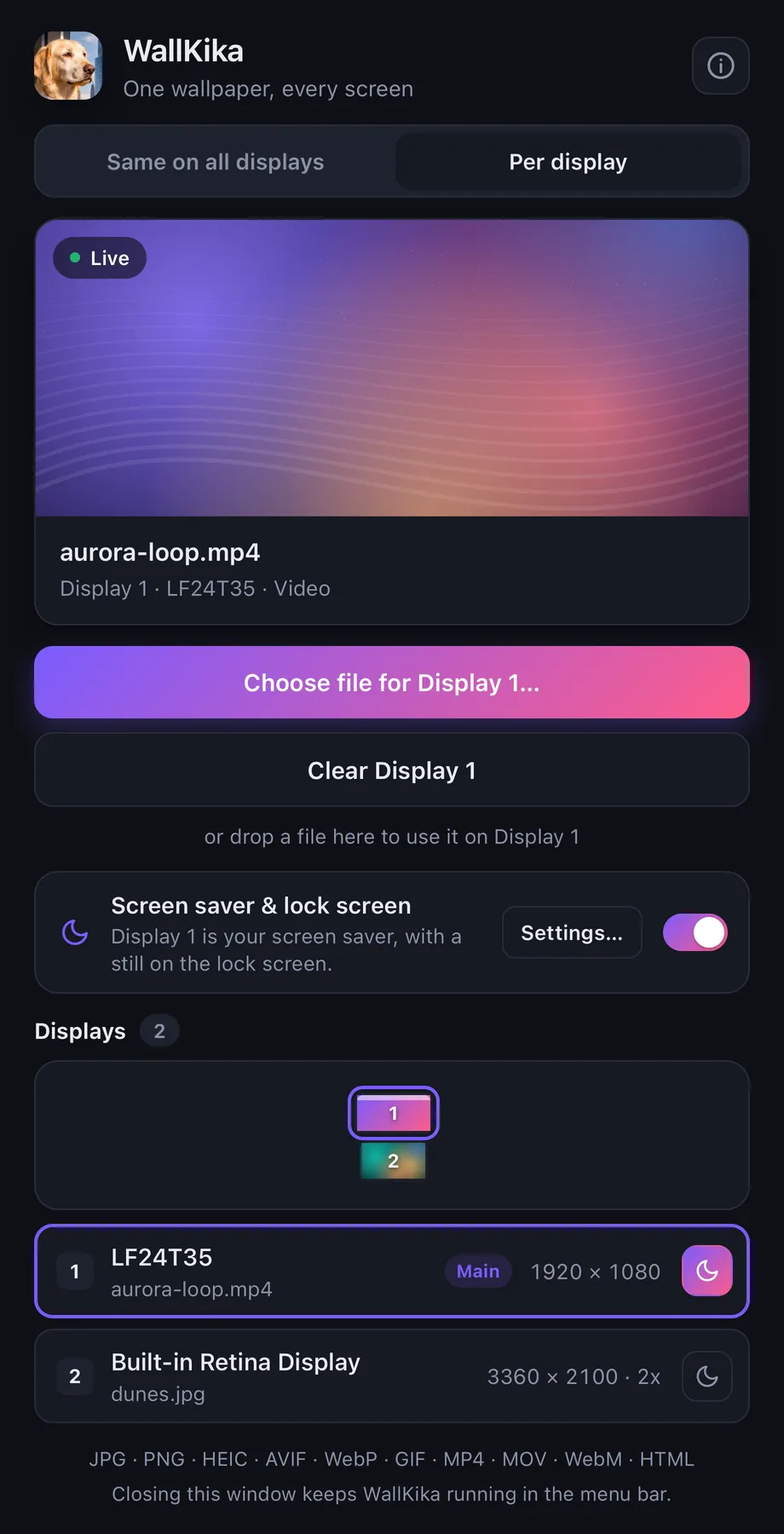
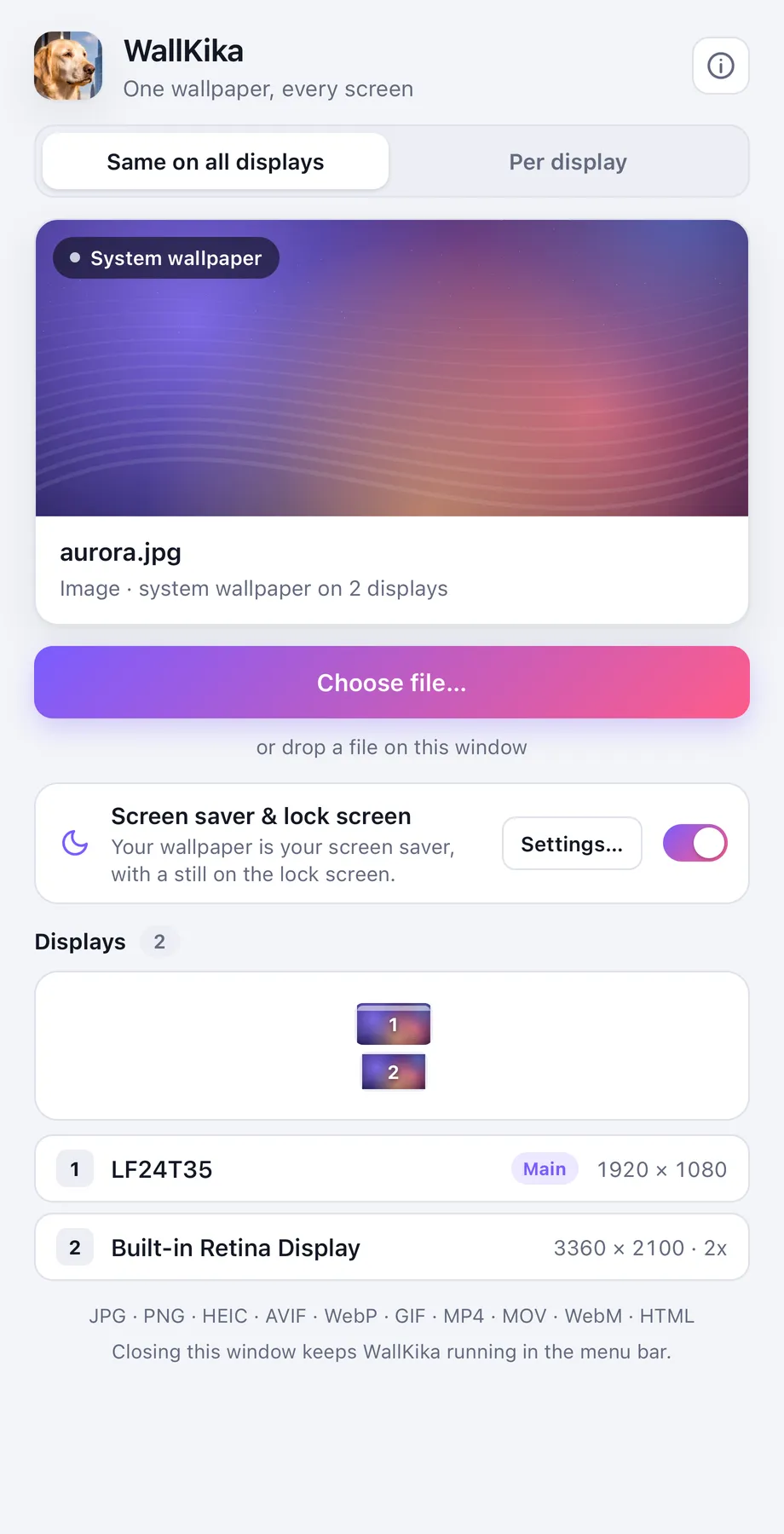
What WallKika can do
- ✓The same wallpaper on every display, or a different one on each display
- ✓Images (JPG, PNG, HEIC, AVIF, WebP, BMP, TIFF) through the system wallpaper API, at zero cost
- ✓Videos (MP4, M4V, MOV, WebM) looping forever and muted, from 2-minute clips to 2-hour files (streamed, never loaded into memory)
- ✓GIFs and HTML pages (clocks, shaders, dashboards) as live wallpapers, sandboxed
- ✓Mixed setups (Retina + 1080p) and hot-plug: a new monitor is covered within 2 seconds
- ✓Runs in the background: closing the window leaves WallKika in the menu bar / system tray, out of Cmd+Tab, Alt+Tab, the Dock and the taskbar
- ✓Your wallpaper on the screen saver and the lock screen: one switch, plus a moon button in "Per display" to pick which display's wallpaper to use
- ✓Videos always play at their real speed: they pause while the screen is locked, asleep or behind the screen saver, and resync when you come back
- ✓Remembers your wallpapers between restarts
- ✓Drag and drop, plus a command line: wallkika file, --display N, --background
- ✓Tells you in the menu and in the window when a new version is out
- ✓Light and dark mode
- ✓Portable downloads for macOS, Windows and Linux
Coming next
- ○Every video format (MKV, AVI, WMV, FLV…) through automatic ffmpeg conversion
- ○Launch at login
- ○Fit modes (cover, contain, stretch), playlists and schedules
- ○Pause while a fullscreen app is active or on battery
- ○Signed releases (Apple notarization, Windows code signing)
- ○Native decoders that decode a video once for all displays
- ○Wayland layer-shell support and a Spanish UI
Download and first run
WallKika is portable: there is nothing to install. Every download is a zip with the app inside. Grab the file for your system and open it.
WallKika-macOS.zip Unzip and open WallKika.app. Move it to Applications if you want to keep it. The app isn't notarized by Apple yet: if macOS blocks it, go to System Settings → Privacy & Security → Open Anyway.
WallKika-Windows-x64.zip Unzip and run WallKika.exe, then pin it to the taskbar or Start if you like. SmartScreen may warn about an unknown publisher: More info → Run anyway. Needs Microsoft Edge WebView2, which Windows 11 and up-to-date Windows 10 already include.
WallKika-Linux-x86_64.zip Unzip and run WallKika.AppImage (if your file manager drops the permission, chmod +x WallKika.AppImage). Some distributions need libfuse2 to open AppImages.
Status
| Platform | Static images | Live wallpapers | Screen saver & lock screen | Tested on real hardware |
|---|---|---|---|---|
| macOS 13+ | ✅ | ✅ | ✅ | ✅ macOS 27, Apple M2, two displays with mixed DPI |
| Windows 10 / 11 (incl. 24H2) | 🧪 | 🧪 | 🧪 | Not yet: compiles cleanly, needs testers |
| Linux (GNOME, KDE, XFCE, Cinnamon, MATE, LXQt, Sway, Hyprland…) | 🧪 | 🧪 X11 / XWayland | 🧪 screen saver on XFCE and MATE | Not yet: compiles cleanly, needs testers |
Windows and Linux testers are very welcome: open an issue on GitHub with what worked and what didn't.
Usage
- Same on all displays. Choose a file or drop it on the window and every display shows it.
- Per display. Pick a display in the map or in the list, then choose a file for it. Each display keeps its own wallpaper; displays without one show the system wallpaper.
- Screen saver & lock screen. Turn on the switch and your wallpaper plays as the screen saver, while the lock screen shows a still of it (HTML pages only go to the screen saver). In "Per display", click the moon next to the display whose wallpaper you want; only one display at a time.
- Menu bar / tray. Open WallKika, stop the live wallpapers, see About, download a new version when one is out, or quit. Closing the window only hides it; Quit closes WallKika completely.
- Command line.
wallkika video.mp4sets it on every display,wallkika --display 2 photo.jpgsets it on display 2, andwallkika --backgroundstarts or hides WallKika without its window.
The screen saver, system by system
WallKika installs its screen saver and selects it through System Events; the first time, macOS asks you to let WallKika control System Events. If you decline, WallKika shows "Last step": click Settings… and choose WallKika yourself (on recent macOS versions it is in Wallpaper → Screen Saver…). The macOS lock screen shows the system wallpaper, so WallKika sets it to a still of your wallpaper; only Apple's own Aerials animate there.
WallKika becomes the screen saver and sets the lock screen picture right away; turning it off gives your previous screen saver back. Settings… opens the Windows dialog to change the wait time.
On XFCE and MATE, WallKika becomes the screen saver right away and gives the previous one back when you turn it off. GNOME, KDE and Cinnamon don't run third-party screen savers, so there it only sets the lock screen picture (through the desktop wallpaper, and the KDE lock screen setting).
▸Settings, logs and uninstalling
Settings live in the app config folder (~/Library/Application Support/com.cristiandjr.wallkika/ on macOS). Logs are in ~/Library/Logs/com.cristiandjr.wallkika/.
To uninstall, quit WallKika and delete the app. If you used the screen saver, turn it off in WallKika first (on Windows and Linux this also brings your previous screen saver back) and then delete ~/Library/Screen Savers/WallKika.saver on macOS, %LOCALAPPDATA%\com.cristiandjr.wallkika\WallKika.scr on Windows or ~/.local/share/applications/screensavers/wallkika.desktop on Linux. The still on the lock screen stays until you pick another wallpaper.
How it works
Use the native wallpaper API of each system: NSWorkspace on macOS, IDesktopWallpaper on Windows, and gsettings, plasma-apply-wallpaperimage, xfconf-query, swww or feh on Linux, depending on the desktop. Zero cost.
Are drawn by borderless webview windows, one per display, placed where the desktop wallpaper lives: the CoreGraphics desktop level on macOS, Explorer's WorkerW or Progman on Windows, and X11 desktop-type windows on Linux (Wayland sessions run through XWayland).
Uses the native mechanism of each system: a small Swift module, WallKika.saver, on macOS; WallKika.scr on Windows; xfce4-screensaver and mate-screensaver on Linux. For the lock screen, WallKika saves a frame of your wallpaper as a JPEG and sets it as the system picture.
- Each window knows its display through a stable hardware ID, so per-display choices survive rearranging monitors.
- Media reaches the windows through a custom wallkika:// protocol that serves exact byte ranges, so huge videos stream smoothly and are never loaded into memory.
- Videos pause while nobody can see them (lock, sleep, screen saver) and resync when you come back; a speed guard fixes any video that plays faster than real time.
- A window that fails to load is recreated automatically.
Tauri 2 · Rust core · TypeScript panel · Swift screen saver module · one codebase for the three systems
Security and privacy
- Wallpaper windows can only read files you picked, plus the folder of an HTML wallpaper, through wallkika://. Everything else is rejected.
- HTML wallpapers run in a sandboxed iframe with no access to the app API.
- The screen saver only reads the wallpaper you included in it. To make the lock screen picture, only WallKika's own window can read the pixels of your media; HTML wallpapers can't.
- Strict Content Security Policy and minimal Tauri permissions. No telemetry.
- WallKika makes a single network request: a check of the latest GitHub release, at launch and every 12 hours. The update link only opens release pages of the repository.
Build from source
Install Node.js 20+, Rust and the Tauri prerequisites for your system (on Linux, also the GStreamer plugins for video). The Rust version is pinned in the repository. Then:
npm install
npm run tauri dev     # run in development
npm run package       # portable build for your OS, written to release/
Every push of a version tag builds macOS, Windows and Linux on GitHub Actions and publishes the three zips on the Releases page. The download buttons above always point to the latest one.
Contributing
Issues and pull requests are welcome, especially from Windows and Linux users: the two backends compile cleanly but still need real hardware.
Open the repository on GitHub ↗Support WallKika
WallKika is free and open source, made with ❤️ in Argentina 🇦🇷. If it's useful to you, you can buy me a coffee: every contribution helps add features and keep it working with each new macOS, Windows and Linux release.
cristiandjr.mp Starring the GitHub repo and sharing WallKika with a friend helps a lot too. Ideas and suggestions: cristiandjr89@gmail.com.
GitHub Releases License Report a problem
MIT License © 2026 cristiandjr. WallKika is free and open source: use it, read it and change it.
Made with ❤️ in Argentina 🇦🇷